Showing posts with label data. Show all posts

Wednesday, June 7, 2017

Remote Desktop Protocol (RDP)

Remote Desktop Protocol (RDP) is a secure network communications protocol for Windows-based applications running on a server.
RDP allows network administrators to remotely diagnose and resolve problems encountered by individual subscribers. RDP is available for most versions of the Windows operating system as well as Mac OS X. An open source version is also available.

bb457106-f08zs01_biglen-us

Noteworthy properties of RDP include encryption, smart card authentication, bandwidth reduction, resource sharing, the ability to use multiple displays and the ability to disconnect temporarily without logging off. RDP also allows redirection of functions such as audio and printing.
RDP can support up to 64,000 independent channels for data transmission. Data can be encrypted using 128-bit keys and the bandwidth reduction feature optimizes the data transfer rate in low-speed connections.
The protocol has presented some security issues, however. For instance, if an administrator opens a thin-client connection between computers, an attacker who is able to break into the RDP connection would have administrator privileges on both computers. It is generally recommended that RDP only be used when it is absolutely necessary and that both the administrator and end user run with the lowest level of privileges possible.
Share:

Beware! This Microsoft PowerPoint Hack Installs Malware Without Requiring Macros

microsoft-powerpoint-macros-malware
"Disable macros and always be extra careful when you manually enable it while opening Microsoft Office Word documents."
You might have heard of above-mentioned security warning multiple times on the Internet as hackers usually leverage this decade old macros-based hacking technique to hack computers through specially crafted Microsoft Office files, particularly Word, attached to spam emails.

But a new social engineering attack has been discovered in the wild, which doesn't require users to enable macros; instead it executes malware on a targeted system using PowerShell commands embedded inside a PowerPoint (PPT) file.

Moreover, the malicious PowerShell code hidden inside the document triggers as soon as the victim moves/hovers a mouse over a link (as shown), which downloads an additional payload on the compromised machine -- even without clicking it.

Researchers at Security firm SentinelOne have discovered that a group of hackers is using malicious PowerPoint files to distribute 'Zusy,' a banking Trojan, also known as 'Tinba' (Tiny Banker).

Discovered in 2012, Zusy is a banking trojan that targets financial websites and has the ability to sniff network traffic and perform Man-in-The-Browser attacks in order to inject additional forms into legit banking sites, asking victims to share more crucial data such as credit card numbers, TANs, and authentication tokens.
"A new variant of a malware called 'Zusy' has been found in the wild spreading as a PowerPoint file attached to spam emails with titles like 'Purchase Order #130527' and 'Confirmation.' It's interesting because it doesn't require the user to enable macros to execute," researchers at SentinelOne Labs say in a blog post.
The PowerPoint files have been distributed through spam emails with subjects like "Purchase Order" and "Confirmation," which when opened, displays the text "Loading...Please Wait" as a hyperlink.
microsoft-powerpoint-macros-malware
When a user hovers the mouse over the link it automatically tries to trigger the PowerShell code, but the Protected View security feature that comes enabled by default in most supported versions of Office, including Office 2013 and Office 2010, displays a severe warning and prompts them to enable or disable the content.

If the user neglects this warning and allows the content to be viewed, the malicious program will connect to the "cccn.nl" domain name, from where it downloads and executes a file, which is eventually responsible for the delivery of a new variant of the banking Trojan called Zusy.
"Users might still somehow enable external programs because they're lazy, in a hurry, or they're only used to blocking macros," SentinelOne Labs says. "Also, some configurations may possibly be more permissive in executing external programs than they are with macros."
Another security researcher, Ruben Daniel Dodge, also analyzed this new attack and confirmed that this newly discovered attack does not rely on Macros, Javascript or VBA for the execution method.
"This is accomplished by an element definition for a hover action. This hover action is setup to execute a program in PowerPoint once the user mouses over the text. In the resources definition of slide1 'rID2' is defined as a hyperlink where the target is a PowerShell command," Dodge said.
The security firm also said that the attack doesn't work if the malicious file is opened in PowerPoint Viewer, which refuses to execute the program. But the technique could still be efficient in some cases.
Share:

Sunday, August 28, 2016

Simple Cool Tricks With Chrome Developer Tool

 Chrome Developer Tool
As you probably know, there is a button on the right-click menu of Google Chrome and IE 10+ called ''Inspect element''. This the developer tool. And you can have a lot of fun with it. I'll give you two examples on how to use it in this tutorial.

1. Change the text of a webpage:

You can have fun on webpages just by changing the value of a <span> (a text label). For example, go on the 4shared.com site (a free file sharing site). Then create an account if you don't have one (or just connect with Google, Facebook or Twitter). When you are done, upload something that is heavy (more than 100 MB) by dragging and dropping it on the home page of 4shared. Then you can see an uploading status window on the screen. So right-click on the percentage and click on ''Inspect element''. Now you can see a little window that appears on the bottom of the web browser. There are to ways : either you got the number or you got the % symbol. If you got the number, try to find the symbol below. Then double-click on it and type what you want (Eg: '',000,000 dollars in my bank account'')

google chrome tricks

2. Get a Non-Crypted password in JS/PhP code:

Some sites are not very safe and just verify the password directly in the PhP/JS code. Then, even if it become rare, you can get the password. Just follow these steps :

  1. Find the login form on the website you want to hack
  2. Right-click on it and then click on ''Inspect element''
  3. Search on the window that appeared ''<form'' and then ''action=''
  4. After it, there is a URL, If it ends by ''.js'', just copy it and paste it in the URL bar of your browser
  5. If it ends by ''.php'', type ''view-source:'' before pasting the URL
  6. Then search something like ''password'' in the code.
WARNING: This method works better with JS than with PHP. Sometimes, there is no URL after ''action='' but just a JS function. Then you have to press Ctrl+U to see the source and search for ''password'' in the whole code.
Share:

Watch Star Wars Movie In CMD

        
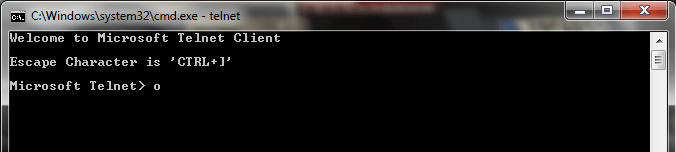
                    This is very intersting and amazing command prompt trick which will play star wars movie in the command prompt or cmd. Below are complete steps with screen shots for this trick with. Without wasting time lets gets started.


       1. Go to start > Run and type in cmd and press enter
       2. Now type in telnet as shown below and press enter.


       3. After that enter o as shown below and press enter.


       4. Next enter towel.blinkenlights.nl as shown below and press enter.


       5. Now star wars movie will start playing on your command prompt.

Share:

Tracking A Person : By Facebook / By Cell Number / By Email.


Internet is filled with people who love to annoy and give out threats. If they are careless, they can be easily tracked, but if it is a professional guy, he might be difficult to trace as he might be using proxy/anonymity tool.
If you think you are in trouble, i would advise you to go to cops. But if you think it is some punk ass guy, follow this tutorial to track him down and kick his ass.
To track him down, you can use mobile number, an email from him, or his Facebook ID.
So lets get it started :


Tracking Somebody By His Facebook ID :


Facebook is full of stalkers and annoying people and fake profiles,  And there is absolutely no way to get rid of them. Sure you can ignore them, but they will start posting on your walls, block them, they will make a new ID. Only way to get rid of them is to muscle them out. And by muscle i mean hack and destroy their PC. To do that, you will need their IP Address, And This tutorial will teach you how to do it.Also we will tell you how to track that person down to his house !
So buckle up.


So we will divide this tutorial in two main parts :

-Getting His IP Address.
-Tracking His IP Address to find his physical location.

Step One : Finding His IP Address :


To do this, we will use the " netstat " command in windows (xp,vista,7,8, doesn't matter), this command will list the active connections and listening ports,and to this this, first you have to invite that person to chat, chat with him for 1-2 minutes, then open your command prompt ( start-cmd ) and then type the following command on it :

netstat -an


And you will get all established connections IP addresses. Note down the suspicious IP’s.

TIP : If you get a whole lot bunch of IP's , close the additional tabs in your browser and terminate the application like antivirus/download managers and retry.


Step Two : Tracing His IP Address :


Once you have got the IP Address you want, its time to trace it. To do that we will need awebsite that give us tracing/ tracking options, some of the best sites are :

http://www.ip-adress.com/ip_tracer/

All these sites can trace the IP Address to his location, and they are pretty easy to use , just jot the IP you noted and put it in their search engine.

Tracking Him Down By His Cell Number :


Are you getting prank calls, or vulgar threats, or simply annoying calls from somebody who doesn't give out his name.
It is pretty easy to track somebody by his cell/landline number. All you got to do is note down his/her number and enter it in this website and it will give you out the details :
http://www.truecaller.com/


Tracking Him Down by His Email Address :


Tracking Email is not new, it has been around since the emails were invented. But the tracking service has definitely got better since them. Email Tracking is comparatively easy than Facebook tracking, all you got to do is follow these simple steps and BAM ! you know the location of the 
sender/reader !


You can use the free service provided by these sites, all you got to do is attach this tiny littleattachment and they will tell you when the reader location is determined. Good thing is that even proxy can't hide the reader. So try them out :
Share:

as