Showing posts with label attack. Show all posts

Wednesday, June 7, 2017

HTTP (Hypertext Transfer Protocol)

HTTP (Hypertext Transfer Protocol) is the set of rules for transferring files (text, graphic images, sound, video, and other multimedia files) on the
World Wide Web. As soon as a Web user opens their Web browser, the user is indirectly making use of HTTP. HTTP is an application protocol that runs on top of the TCP/IP suite of protocols (the foundation protocols for the Internet).

http

HTTP concepts include (as the Hypertext part of the name implies) the idea that files can contain references to other files whose selection will elicit
additional transfer requests. Any Web server machine contains, in addition to the Web page files it can serve, an HTTP daemon, a program that is designed to wait for HTTP requests and handle them when they arrive. Your Web browser is an HTTP client, sending requests to server machines.
When the browser user enters file requests by either “opening” a Web file (typing in a Uniform Resource Locator or URL) or clicking on a hypertext link, the browser builds an HTTPrequest and sends it to the Internet Protocol address (IP address) indicated by the URL. TheHTTP daemon in the destination server machine receives the request and sends back the requested file or files associated with the request. (A Web page often consists of more than one file.)
Share:

Computer Ports – Name and Location Of Connections On Computer

For those of you who do not know what the connectors or connections on the back of your computer are called or where they are located… We have created a number of Computer Port Charts and other computer peripheral charts to help you identify the common connectors and ports on the back of your desktop computer or laptop. The charts include location for sound, audio, video, usb, serial and parallel ports. Included are separate charts forhard drives, desktop ram memory, laptop ram memory and a chart that explains everything on the back of your computer by name, location and illustration.
Computer ports are connecting points or interfaces with peripheral devices that work to communicate with your computer.
computer-ports-identification-chart

Computer Ports Identification Chart

Most Common PHYSICAL computer ports:
– USB Port (Universal Serial Bus): Created in the mid 1990’s to standardize communications between computers and peripheral devices. USB ports can be used as a power supply for different devices like cellphones, cameras, laptop coolers and more. There are four different types of USB computer ports: USB 1.0 and 1.1 released between 1996 and 1998 with a speed range starting from 1.5 Mb/sec up to 12 Mb/sec. Then USB 2.0 was released in 2000 with a maximum speed of 480 Mb/sec. Finally USB 3.0 was released in 2008 with a maximum speed of 5 Gb/sec.
– Ethernet / Internet Ports: were first introduced in 1980 to standardize the local area networks (LAN). Internet ports use RJ45 connectors and have speeds between 10 Mb/sec – 100 Mb/sec – 1 Gb/sec – 40 Gb/sec – 100 Gb/sec.
– IEEE 1394 Ports: This technology was developed by Apple between 1980 and 1990 with the name “FireWire” and it is the equivalent of the USB.
– TRS Ports: Used for receiving and transmitting analog signals mainly audio.
– PS/2 Ports: Introduced in 1987 to replace the serial mouse and keyboard.
– Serial Port: Uses the DB9 socket connector and transfers information one bit at a time between the computer and external peripherals.
– VGA ports (Video Graphics Array): This port has 15 pins on three rows and it is used for connecting the monitor with the video adapter from the computer motherboard to display video on your monitor.
– HDMI (High Definition Multimedia Interface): Ports on computer to transmit High Definition (1080p+) Video from the computer video card to the monitor.
– DVI (Digital Visual Interface): Computer ports used to transmit uncompressed digital video data.
computer-port-chart

Common Computer Ports Chart

desktop-ram-chart

Desktop Ram Identification Chart

hard-drive-chart

Hard Drive Identification Chart

notebook-ram-chart

Notebook RAM Memory Identification Chart


back-of-computer-port-chart

Back of Computer Port Identification Illustration

Share:

Remote Desktop Protocol (RDP)

Remote Desktop Protocol (RDP) is a secure network communications protocol for Windows-based applications running on a server.
RDP allows network administrators to remotely diagnose and resolve problems encountered by individual subscribers. RDP is available for most versions of the Windows operating system as well as Mac OS X. An open source version is also available.

bb457106-f08zs01_biglen-us

Noteworthy properties of RDP include encryption, smart card authentication, bandwidth reduction, resource sharing, the ability to use multiple displays and the ability to disconnect temporarily without logging off. RDP also allows redirection of functions such as audio and printing.
RDP can support up to 64,000 independent channels for data transmission. Data can be encrypted using 128-bit keys and the bandwidth reduction feature optimizes the data transfer rate in low-speed connections.
The protocol has presented some security issues, however. For instance, if an administrator opens a thin-client connection between computers, an attacker who is able to break into the RDP connection would have administrator privileges on both computers. It is generally recommended that RDP only be used when it is absolutely necessary and that both the administrator and end user run with the lowest level of privileges possible.
Share:

ImageTragick Exploit Used in Attacks to Compromise Sites via ImageMagick 0-Day

imagetragick-exploit-used-in-attacks-to-compromise-sites-via-imagemagick-0-day-503649-2
Two Russian security researchers revealed a few hours ago a vulnerability in the ImageMagick image processing library deployed with countless Web servers, a zero-day which they say has been used in live attacks.
Nicknamed ImageTragick and identified via the CVE-2016–3714 vulnerability ID, the issue has a massive attack surface, since alongside the GD library, ImageMagick is one of the most used image processing toolkits around.
Attackers can take over servers via ImageMagick
According to the two researchers, there are more than one vulnerabilities in ImageMagick, but the one they call ImageTragick has been used to compromise websites via malicious images uploaded on the server.
The zero-day, which they say is trivial to execute, is still unpatched, but the ImageMagick project has been notified today.
Usually such sensitive bug fixing operations would be carried out in complete privacy, but their decision to go public was influenced by the fact that attackers used the zero-day to compromise servers, and the researchers wanted to give webmasters the opportunity to mitigate the attacks.
Mitigation instructions are available on ImageTragick’s website. Proof-of-concept code (Metasploit modules) will be published later on today.
Hackers only need to find websites that allow users to upload photos
Because ImageMagick is at the base of many image processing libraries and modules, used across a large number of programming languages like Ruby, JavaScript, PHP, Java, and more, any website, running on any platform is vulnerable to this zero-day.
The only condition is that users are allowed to upload files to the server, and a large number of websites do via “user avatar” options.
The researchers declined to reveal any clues regarding the exploitation routine, but based on the mitigation advice, it involves magic bytes and ImageMagick coders.
Magic bytes are the first few bytes of a file used programmatically to identify the image type (GIF, JPEG, PNG, etc.). ImageMagick coders are ImageMagick modules that read and write data to specific image file types.
The researchers said that there’s an RCE (Remote Code Execution) bug somewhere in there, that allows attackers to write code to the server. If an attacker is skilled enough, he can upload a malicious image, which uses the zero-day to write a webshell to disk and uses it to take over control of the entire server.

UPDATE: The first exploits have surfaced here and here.
Share:

Social Engineering: The Art of Human Hacking

chris-hadnagy

Kevin Mitnick the most famous all time best top 1 social engineers proved how social engineers dangerous and can Hack Human with the art of social engineering, as the book name implies this books reveal all the secret of social engineering. this is very intresting ebook rather then other because for computer hacking you need the computer device, Internet and a knowledge so you know what you are going to do. but for social engineering you don’t need any of this, you need to learn how to manipulate people mind so they will do what you want to do from them.

DOWNLOAD LINK:
Click Here
Share:

hashcat – Multi-Threaded Password Hash Cracking Tool

10834792876_098c17098b
hashcat claims to be the world’s fastest CPU-based password recovery tool, while not as fast as GPU powered hash brute forcing (like CUDA-Multiforcer), it is still pretty fast.
hashcat was written somewhere in the middle of 2009. Yes, there were already close-to-perfect working tools supporting rule-based attacks like “PasswordsPro”, “John The Ripper”. However for some unknown reason, both of them did not support multi-threading. That was the only reason to write hashcat: To make use of the multiple cores of modern CPUs.
Granted, that was not 100% correct. John the Ripper already supported MPI using a patch, but at that time it worked only for Brute-Force attack. There was no solution available to crack plain MD5 which supports MPI using rule-based attacks.
Hashcat, from its first version, v0.01, was called “atomcrack”. This version was very poor, but at least the MD5 kernel was written in assembler utilizing SSE2 instructions and of course it was multi-threaded. It was a simple dictionary cracker, nothing more. But it was fast. Really fast. Some guys from the scene become interested in it and after one week there were around 10 beta testers. Everything worked fine and so requests for more algorithm types, a rule-engine for mutation of dictionaries, a windows version and different attack modes were added. These developments took around half a year, and were completely non-public.

Features
  • Multi-Threaded
  • Multi-Hash (up to 24 million hashes)
  • Multi-OS (Linux, Windows and OSX native binaries)
  • Multi-Algo (MD4, MD5, SHA1, DCC, NTLM, MySQL, …)
  • SSE2, AVX and XOP accelerated
  • All Attack-Modes except Brute-Force and Permutation can be extended by rules
  • Very fast Rule-engine
  • Rules compatible with JTR and PasswordsPro
  • Possible to resume or limit session
  • Automatically recognizes recovered hashes from outfile at startup
  • Can automatically generate random rules
  • Load saltlist from external file and then use them in a Brute-Force Attack variant
  • Able to work in an distributed environment
  • Specify multiple wordlists or multiple directories of wordlists
  • Number of threads can be configured
  • Threads run on lowest priority
  • Supports hex-charset
  • Supports hex-salt
  • 80+ Algorithms implemented with performance in mind

DOWNLOAD LINK:
Share:

Monday, August 29, 2016

REQUEST A QUOTESEE A DEMO SQL Injection Cheat Sheet & Tutorial: Vulnerabilities & How to Prevent SQL Injection Attacks

What is SQL Injection?

SQL injection is a type of web application security vulnerability in which an attacker is able to submit a database SQL command that is executed by a web application, exposing the back-end database. A SQL injection attack can occur when a web application utilizes user-supplied data without proper validation or encoding as part of a command or query. The specially crafted user data tricks the application into executing unintended commands or changing data. SQL injection allows an attacker to create, read, update, alter or delete data stored in the back-end database. In its most common form, a SQL injection attack gives access to sensitive information such as social security numbers, credit card numbers or other financial data. According to Veracode’s State of Software Security Report, SQL injection is one of the most prevalent types of web application security vulnerability.

Key Concepts of a SQL Injection Attack

  • SQL injection is a software vulnerability that occurs when data entered by users is sent to the SQL interpreter as a part of a SQL query.
  • Attackers provide specially crafted input data to the SQL interpreter and trick the interpreter to execute unintended commands.
  • Attackers utilize this vulnerability by providing specially crafted input data to the SQL interpreter in such a manner that the interpreter is not able to distinguish between the intended commands and the attacker’s specially crafted data. The interpreter is tricked into executing unintended commands.
  • A SQL injection attack exploits security vulnerabilities at the database layer. By exploiting the SQL injection flaw, attackers can create, read, modify or delete sensitive data.

SQL Injections: The Most Prevalent Type of Application Security Vulnerability

With more than 20 percent of all web vulnerabilities being attributed to SQL injection, this is the second most common software vulnerability. Therefore, having the ability to find and prevent SQL injection should be top of mind for web developers and security personnel. In general, a SQL injection attack exploits a web application that does not properly validate or encode user-supplied input and then uses that input as part of a query or command against a back-end database. For example, a typical form may ask for an ID and create a URL: "http://www.somewebsite.com/id/id.asp?id=somedata". An attacker using SQL injection may enter "somedata or 1=1". If the web application does not properly validate or encode the user-supplied data and sends it directly to the database, the reply to the query will expose all IDs in the database, since the condition "1=1" is always true. This is a basic example, but it illustrates the importance of sanitizing user-supplied data before using it in a query or command.

SQL Injection Video

The following video tutorial on SQL injection walks you through more on topics such as "what is SQL injection?" "methods of SQL injection protection" and "how to avoid a SQL injection attack."

SQL Injection Example

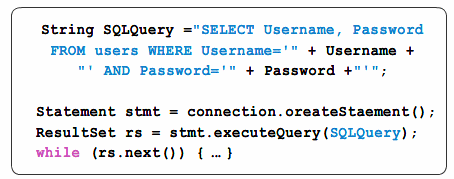
Let’s look at the example code below.
sql injection code
You will notice that user input is required to run this query. The interpreter will execute the command based on the inputs received for the username and password fields. sql injection query
If an attacker provides ‘or 0=0’ as the username and password, then the query will be constructed as:
String SQLQuery =”SELECT Username, Password FROM users WHERE Username=” or 0=0” AND Password=” or 0=0”;
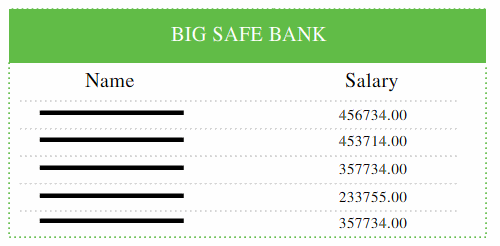
sql injection tutorial
Since under all circumstances, zero will be equal to zero, the query will return all records in the database. In this way, an unauthorized user will be able to view sensitive information. 

Preventing SQL Injection

  • You can prevent SQL injection if you adopt an input validation technique in which user input is authenticated against a set of defined rules for length, type and syntax and also against business rules.
  • You should ensure that users with the permission to access the database have the least privileges. Additionally, do not use system administrator accounts like “sa” for web applications. Also, you should always make sure that a database user is created only for a specific application and this user is not able to access other applications. Another method for preventing SQL injection attacks is to remove all stored procedures that are not in use.
  • Use strongly typed parameterized query APIs with placeholder substitution markers, even when calling stored procedures.
  • Show care when using stored procedures since they are generally safe from injection. However, be careful as they can be injectable (such as via the use of exec() or concatenating arguments within the stored procedure).

SQL Injection Cheat Sheet

The following SQL Injection Cheat Sheet provides a summary of everything you need to know about SQL injection. The SQL Injection Cheat Sheet contains the key concepts of a SQL injection attack, a SQL injection example and tips to avoid a SQL injection hack.

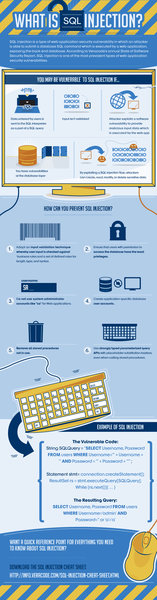
"What is SQL Injection?" an Injection Attack Infographic

To further illustrate injection attacks and preventative steps, we've created this original infographic titled "What is SQL injection," which serves as a visual tutorial to demonstrate how you might be vulnerable to injection attacks, how you can prevent SQL injection and an additional example of SQL injection. If you like this infographic, please share it. And you can embed it on your website with the HTML code below it.
sql injection infographic

Add This SQL Injection Infographic to Your Website

Share:

as